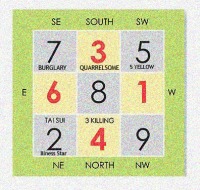
2010 Flying Stars Chart (Pic taken from wofs.com)
After reading Feng Shui World magazine, I would like to share the best contents in it with all people who believe in Feng Shui.
FIVE YELLOW (WU HUANG)
This year, the fearsome 5 Yellow has changed its place to Southwest (SW). As you all know, this star brings misfortune and tragedies. Unfortunately, this year’s 5 Yellow is even stronger than before, because 5 Yellow is an earth element star; flying into SW which also an earth element sector, cause the affliction even greater. The best cure for this star is to vacate the room afflicted by it. If you cannot move out, then must keep this place quite, keep windows closed, and door closed. So that means, no loud musics and TV here. More importantly, you need to place feng shui cures. So, you can:
1) Place Five Element Pagoda with 10 Powerful Mantras at the afflicted area, or
2) Place Five Element Big Bell (best is 12 inches high), and must strike the bell at least once a day, or
3) Wear Double Circle Pendant with a sqaure design in the centre.
For houses that the main door is facing SW, please use another door if possible. Otherwise, must place one of the cures mentioned above. These also apply to office feng shui placement. And remember, NO RENOVATION in this sector.
THREE KILLINGS
Just looking at these two words will probably make you shiver. So what it does to us? Well, it causes 3 kinds of losses, that is, the loss of one’s good reputation, the loss of wealth and the loss of a loved one.
In 2010, 3 Killings flies into the North sector of the house or office. Anybody’s bedroom in the North sector is afflicted by this scary star. If possible, you need to use another room just to avoid the 3 Killings for this year. Next year, if there is not afflicted by any bad flying stars, then you can move back to the room.
The best object cure for Three Killings is to place 3 divine guardians, ie. the Chi Lin, Fu Dog and Pi Yao at the afflicted area.
For houses that face this direction, please use other door, or keep the place quite, keep the door and windows closed during afternoon hours.
TAI SUI
In year 2010, the Grand Duke resides in NE3. Although this year’s Tai Sui is not fiercely angry, but cautions should be taken. You can place the Tai Sui plaque with specially written Taoist talisman in the afflicted room, as this plaque can appease the Tai Sui and enlists the Tai Sui’s help to attract prosperity and abundance
Also, the location where the Tai Sui is progressing towards (clockwise), that is, the East 2 location; is unlucky to face this direction because this is deemed rude, so not advisable to face.
Important: Do not disturb the place of the Tai Sui! So, that means, no renovation. Keep this place quite at all times.
BURGLARY STAR 7 (or VIOLENT STAR 7)
This year, Bulgrary Star 7 flies to Southeast (SE) sector of the house or office. It’s obvious that this star will bring financial loss. Furthermore, is also brings violence and make you vulnerable to being cheated. Hence, getting the right remedies is crucial. The best you should get is the double-horned rhino & 6-tusk elephant. Then, place this pair in the SE flanking any door you have there. If your bedroom is in this sector and cannot change to other room, you can hang small blue rhinos on your handbag to protect against snatch thieves.
Even though the metal element of Bulgrary Star 7 hit the wood element of SE, which gives the bad star even greater influence, BUT blessings still keep pouring in from heaven. With the Star of Golden Deity (SE1) and Heavenly Seal (SE3) bringing auspicious energy to these sectors, anyone staying here is blessed.
ILLNESS STAR 2
The Ilness Star 2 flies to the Northeast (NE) this year and brings illnesses to whoever resides in this sector. Houses facing NE or room in NE should place metalic cures here. If your bedroom is here, make sure to move your bed away from NE corner. Then, place a brass wu lou with antahkarana symbol by your bed side. The wu lou should be tied with red string to adtivate its chi energy.
QUARRELSOME STAR 3
This year, the South sector is hit by Quarrelsome Star 2. This is not good for relationship and especially marriage. For those of you who works in the big company, this aggrevations is bad too. This star can cause a host of interpersonal strife to flare up even between closest of allies, friends and loved ones. Luckily, this year, the Quarrelsome Star 3 is less strong because its intrinsic wood element is exhausted by the fire energy in the South.
Nontheless, you can place fire features here to exhaust its wood energy. So red color is good. You can place Fire Sword, or the Flaming Magic Wheel to subdue the quarrelsome energy.
If you are interested in getting those cures mentioned above, you can go to http://www.wofs.com
Source: Feng Shui World magazine and Lillian Too & Jennifer Too Fortune & Feng Shui 2010



 My First Blog